
Chicago Tribune
Tribune Publishing Inc.News & Magazines
2.6793.00 Reviews
- Version
- 10.0.60
- Installs
- 100.00K
- Age Rating
- Everyone
Screenshots
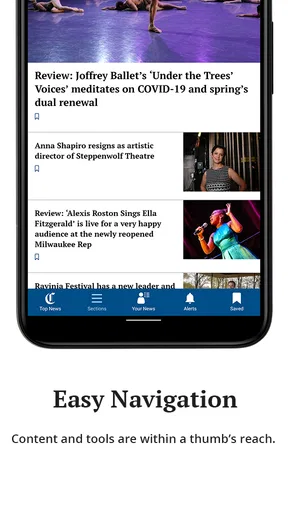
Our Review of Chicago Tribune
 Analysis by Appyee
When I want a quick sense of what is happening in Chicago, I want more than a stream of headlines: I want local reporting that helps me decide what deserves my attention. The Chicago Tribune app is built around that need, bringing the newspaper’s coverage onto a phone for readers who follow the city from nearby or from a distance. I’d treat it as a focused local-news companion, rather than a replacement for every source I use to understand the wider world.
Starting with a Chicago-shaped news routine
The app is a free news and magazines app from Tribune Publishing Inc., and its audience is not limited to people who live within city limits. A former resident checking on neighborhood changes, a commuter looking for local developments, or someone with family in the area can all have a reason to open it. Its strength is the Chicago lens: when a story affects the city, local context can be more useful than a national outlet’s brief mention.
That focus also gives me a practical way to decide whether it belongs on my home screen. If I regularly follow Chicago civic life, sports, culture, or neighborhood news, a dedicated publication can make those stories easier to find than a broad aggregator. If I only want a general headline scan, or I rarely care about the city, a national news app or a mixed-source reader may be a better fit.
From opening the app to choosing what matters
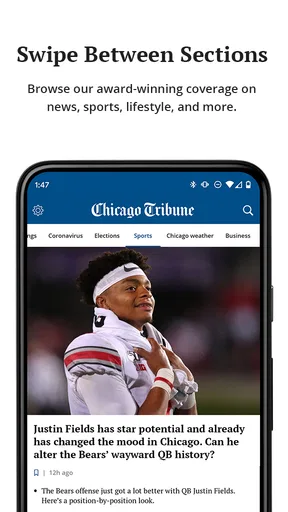
First things first, downloading the app is a breeze. Available on both Android and iOS, it ensures that no one misses out on their daily dose of Chicago updates. Once installed, you’re greeted with a clean and intuitive interface. The layout is sleek, and it's clear that user experience was a top priority for the developers. You won't find yourself lost in a maze of options; everything is neatly categorized and easy to navigate.
The app is rated for Everyone, and its current version is 10.0.52, with Android 8.0 as the minimum operating-system requirement. Those details are useful when deciding whether an older phone is likely to be compatible. The publication has been available since October 11, 2010, and has passed 100,000 installs. Its average rating is 2.6 from around 1,900 ratings, with 790 written reviews, so I would approach the polished premise with realistic expectations rather than assuming every reader has had a flawless experience.
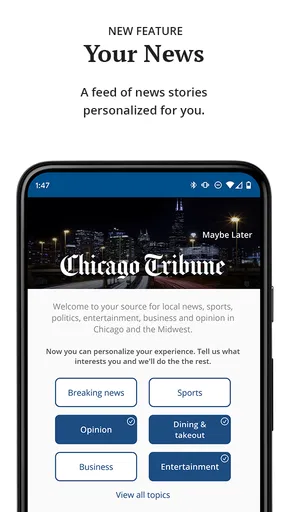
One of the standout features of the Chicago Tribune app is its customization. You can tailor the news feed according to your interests. Whether it's politics, sports, or local happenings, you can tweak the settings to focus on what matters most to you. It feels like having your very own Chicago curator, picking out stories that resonate with your personal tastes.
A useful way to make that customization work is to think about the reason you are opening the app before changing the feed. If you mainly need civic updates, give those stories priority; if you follow a local team, make sports an intentional part of the mix. I would avoid trying to make the feed represent every possible interest at once. A narrower selection can make a short check-in more manageable, while still leaving room to browse beyond your usual topics when you have time.
A realistic day: check, save time, and catch up
Imagine checking the news over breakfast before heading out. I’d scan the local headlines first, open the stories that could affect my plans or understanding of the city, and leave lighter reads for later. On a commute, I’d use the app to fill a few quiet minutes rather than expect it to replace a full newspaper-reading session. That small distinction matters: a phone feed is most useful when I give it a clear job, not when I expect it to deliver every kind of reporting in one sitting.
Another useful workflow is to separate immediate updates from deeper reading. A breaking item may tell me what happened, while a longer report can help explain why it matters. When a story raises a question about a neighborhood, local government, or a team, I’d look for related coverage before forming a conclusion. A single headline can be a starting point, but the value of a local publication often lies in following the subject across more than one article.
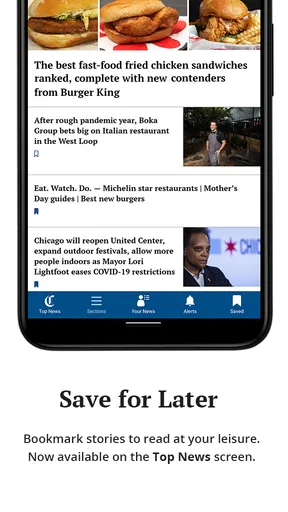
For readers who travel or have an unreliable connection, the original article describes an offline mode for downloading articles ahead of time. That can be helpful before boarding a train or leaving home, but it works best as preparation: choose what you want to read while connected, then use the saved material when service drops. It is less suitable for following a fast-moving story in real time, because offline reading cannot substitute for fresh updates.
Where local reporting fits among other sources
For sports enthusiasts, the app offers comprehensive coverage of Chicago’s beloved teams. Whether you're a die-hard Bears fan or bleed Cubbie blue, you’ll find scores, stats, and analysis that keep you in the loop. Plus, with push notifications, you won’t miss any breaking news or game highlights.
That sports focus is most useful when I want a local angle rather than a generic league-wide roundup. I can make the Tribune one stop in a wider routine: use it for city-specific reporting and team coverage, then turn to a league service or live broadcast when I need rapid play-by-play detail. A newspaper app and a dedicated sports tracker serve different purposes, so there is little benefit in expecting one to perform exactly like the other.
Entertainment coverage is another strong suit. From theater shows to the latest restaurant openings, the app keeps you updated on all things fun and cultural. It’s like having a friend who always knows what’s happening in town and never lets you miss out on the action.
For someone planning a weekend, that coverage can help generate ideas, while a maps app or venue’s own information is still the better tool for checking practical details before leaving. I would use the Tribune to discover what is worth considering, then verify the logistics at the point of planning. This handoff keeps the news app in its strongest role: helping me notice local stories and possibilities, rather than asking it to manage the entire outing.
Notifications, subscriptions, and the points of friction
While the app is packed with features, there’s always room for improvement. Some users have noted that the push notifications can be a bit overwhelming if not managed properly. It's worth taking a moment to adjust your settings to avoid notification overload.
My practical approach would be to allow alerts only if I genuinely want interruptions for news. If I tend to read at set times, opening the app on my own schedule may be calmer than letting every alert compete for attention. Notifications are a handoff from the publication to the lock screen; they can bring an important update to me quickly, but too many can make it easier to ignore all of them. I’d review the choices after a few days and keep only the alerts that change how I use the app.
The app is free to download, but it also offers in-app purchases ranging from $0.99 to $199.99 per item. That means “free” describes the starting point, not necessarily every reading option. Before committing to a purchase, I’d check what the specific offer includes and whether it suits how often I read. Someone who dips in occasionally may prefer to stay with what is available without paying, while a frequent reader may find a paid option worth considering if it supports their routine. I would not assume that every article or feature is included at no cost.
Additionally, while the app is generally smooth, there are occasional hiccups with loading times, especially when accessing multimedia content. It’s not a deal-breaker, but something that could use a bit of polishing.
That friction changes how I’d use it on a weak connection. Text reading is a more dependable choice when I need a quick update, while multimedia stories are better saved for a moment when loading delays will not interrupt me. If a page stalls, repeatedly tapping can make the experience more irritating; I’d return later or switch to another source for urgent information. For a reader who depends on instant, uninterrupted access, that occasional delay deserves more weight than it would for someone who reads at a relaxed pace.
Who will get the most from it
I’d recommend giving the app a try if Chicago is part of your daily life, your work, your family connections, or your interests. Local readers can use it to keep an eye on civic issues and cultural coverage; former residents can maintain a connection to the city; and sports fans can follow the teams with reporting grounded in the local conversation. The best fit is someone who values that perspective enough to open a dedicated publication regularly.
I’d be more cautious if you want a single app to cover every city, country, and topic equally, or if you prefer a source-neutral feed that blends reporting from many publishers. An aggregator is usually better for comparing how multiple outlets cover the same national story. A public broadcaster or international outlet may be a stronger first stop for broad world news. The Tribune’s appeal is not that it replaces those options; it is that it can add depth where its Chicago focus matters.
There is also a question of reading style. If you like to browse headlines and then follow one subject in depth, the app’s publication-based approach makes sense. If you want only short alerts or live scores, a dedicated alerts or sports app may get you to the information faster. I would choose according to the task: local context here, fast utility elsewhere. That division keeps expectations fair and helps the app earn its place without pretending to be the right tool for every moment.
How the experience holds up in everyday use
I find the app works best when I treat it as one deliberate stop in a broader news routine: start with Chicago coverage, decide which story merits a closer read, then hand off elsewhere for practical details or a wider perspective. That approach makes its local focus useful without asking it to do everything. The main question is whether that focused reading habit holds up once alerts, paid options, and occasional loading friction enter the picture.
Room for Improvement
While the app is packed with features, there’s always room for improvement. Some users have noted that the push notifications can be a bit overwhelming if not managed properly. It's worth taking a moment to adjust your settings to avoid notification overload.
Additionally, while the app is generally smooth, there are occasional hiccups with loading times, especially when accessing multimedia content. It’s not a deal-breaker, but something that could use a bit of polishing.
Final Thoughts
All in all, the Chicago Tribune app is a must-have for anyone who loves Chicago or simply wants to stay informed about one of America's most dynamic cities. Its user-friendly design, customizable features, and comprehensive coverage make it a standout choice for news and entertainment junkies alike.
So, whether you're sipping coffee on a chilly Chicago morning or lounging on a sunny beach far away, the Chicago Tribune app ensures you’re always connected to the city you love. Why not give it a try and see for yourself?
Verdict
Strengths of Chicago Tribune
- Comprehensive news coverage.
- User-friendly interface.
- Customizable notifications.
- Offline reading available.
- Cross-platform synchronization.
Limitations of Chicago Tribune
- Ads can be intrusive.
- Limited free article access.
- Occasional app crashes.
- Subscription required for premium.
- Some features require login.
Other Releases by Tribune Publishing Inc.
View All
New York Daily News
News & Magazines3.3

Hartford Courant
News & Magazines2.6

Sun Sentinel
News & Magazines2.8

Orlando Sentinel
News & Magazines2.3
Similar Picks in This Category
View All
Google News - Daily Headlines
Google LLC4.0

X
X Corp.4.8

Flipboard:Your Social Magazine
Flipboard3.4

Opera News: breaking & local
Opera4.5

Hindi News by Dainik Bhaskar
Dainik Bhaskar Group4.0

Way2News Daily News App
Way2News ( Formerly Way2SMS )4.6
Frequently Asked Questions
What features does the Chicago Tribune app offer?
The Chicago Tribune app provides users with up-to-date news coverage, including local, national, and international stories. It features personalized news alerts, access to opinion pieces, and multimedia content like videos and photo galleries. Additionally, users can explore in-depth investigative reports and enjoy a streamlined, user-friendly interface for easy navigation.
Is the Chicago Tribune app free to use?
The app is free to download and offers some free content. However, for full access to all articles and exclusive content, a subscription is required. There are various subscription options available, which can be selected based on the user’s reading preferences and needs. Promotional offers may also be available from time to time.
Does the app support offline reading?
Yes, the Chicago Tribune app supports offline reading. Users can download articles and save them to read later without an internet connection. This feature is particularly useful for commuters or those who want to catch up on news while traveling in areas with limited connectivity.
How can I customize notifications in the Chicago Tribune app?
Users can customize notifications by navigating to the settings within the app. Here, they can choose which types of news alerts they wish to receive, such as breaking news, sports updates, or entertainment. This ensures that users only receive information relevant to their interests, reducing unnecessary alerts.
Is the Chicago Tribune app available for both Android and iOS devices?
Yes, the Chicago Tribune app is available on both Android and iOS platforms. Users can download it from the Google Play Store for Android devices and the Apple App Store for iOS devices. Regular updates ensure compatibility with the latest operating systems and improved app performance.
